How to Use Bike Maps Offline: Download an Area Before You Go
Download the map, terrain, 3D view and points of interest for a route corridor or a map area, so TrailScout and Bike GPS work with no signal at all.
Quick answer
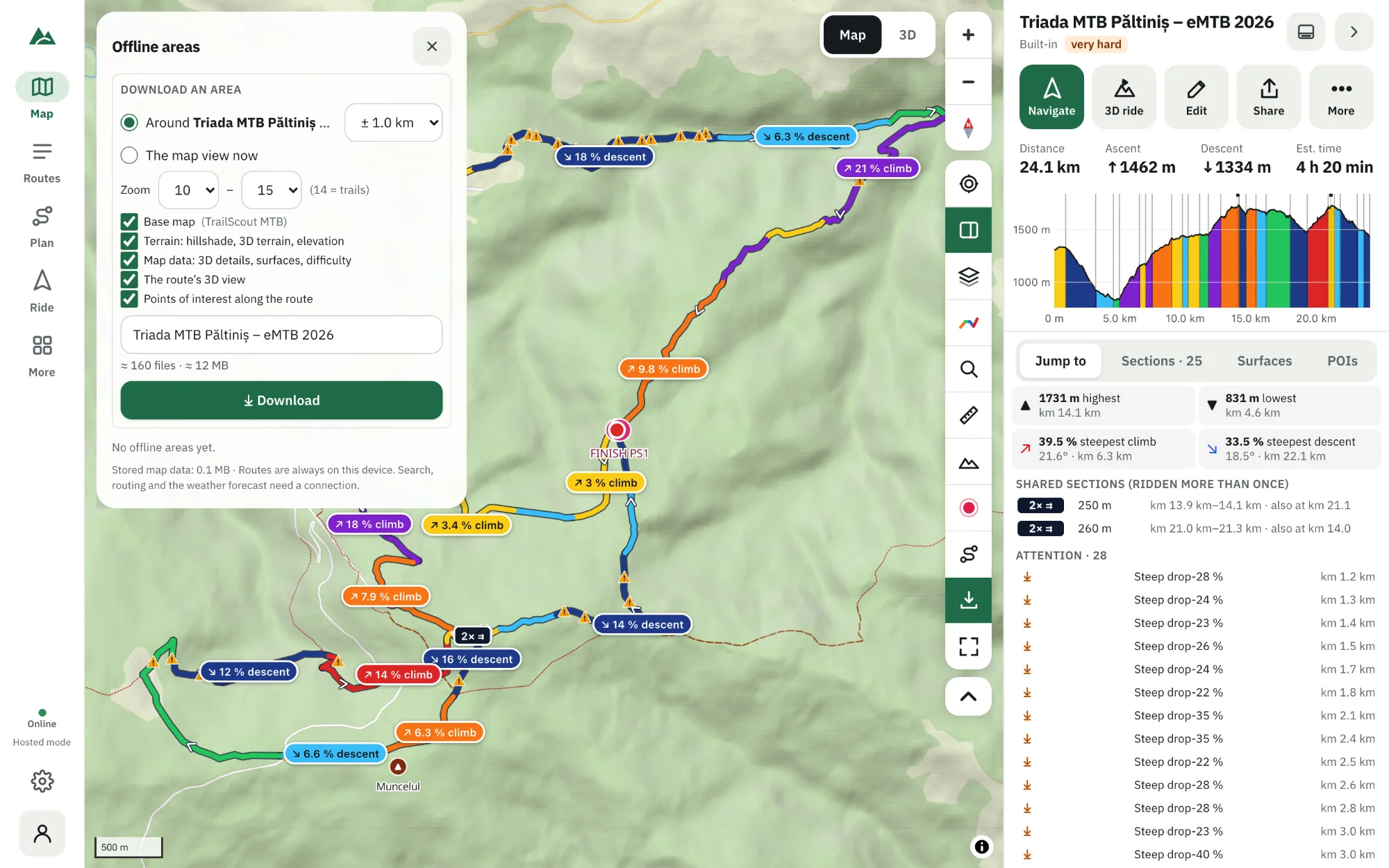
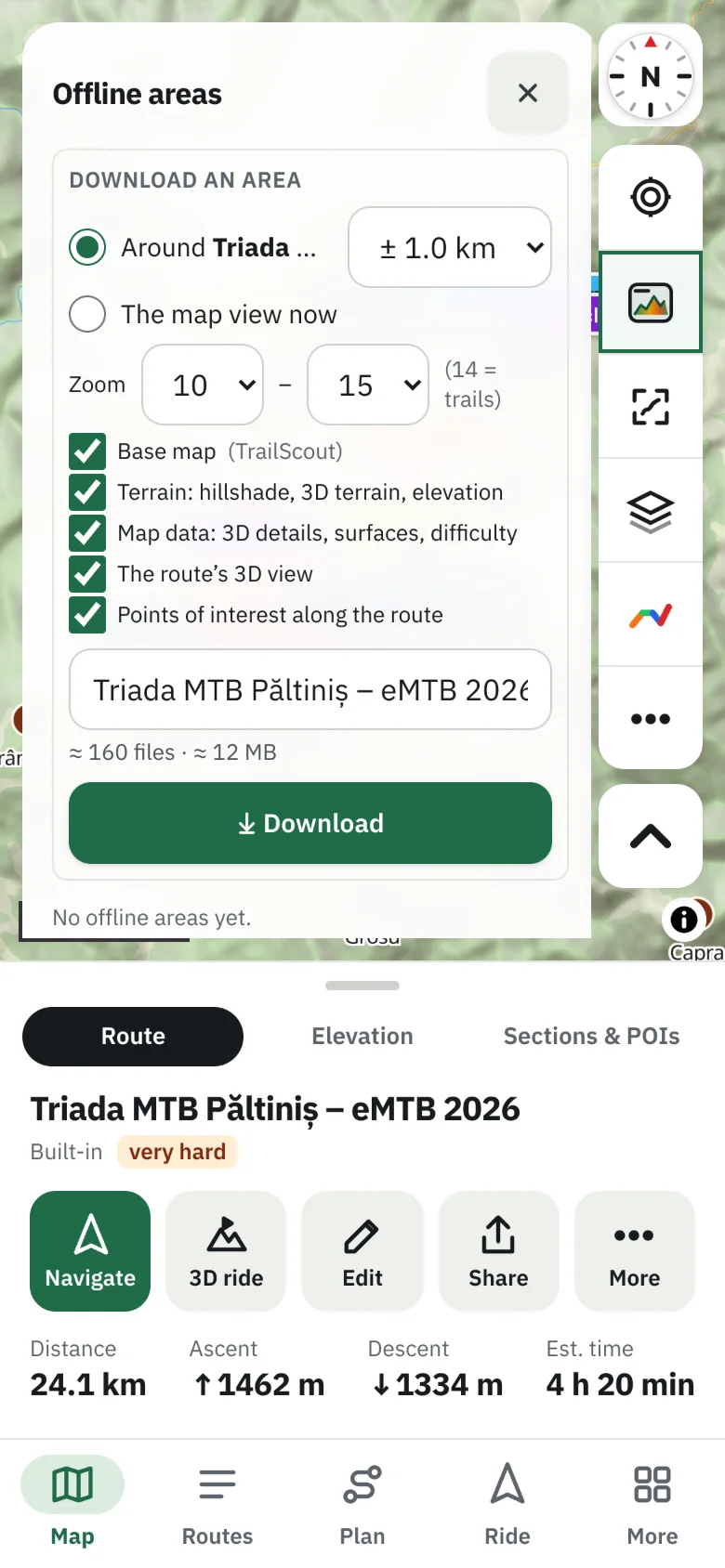
In TrailScout open More → Offline areas, choose Around the selected route (a corridor, e.g. 1 km each side) or The map view now, pick what to include — base map, terrain, map data for 3D and surfaces, the route's 3D view and the points of interest along the route — and the top zoom (14 is trail level), then press Download. The size is shown before you start; downloads run four files at a time, can be paused and resume after an interruption.
Key takeaways
- A corridor along the route is far smaller than a rectangle — and covers what you ride.
- Zoom 14 shows trails; 16–18 is close-up detail and much bigger.
- Include the route's 3D view to open the 3D scene without signal.
- Routes, recording, Bike GPS and Emergency mode work offline; search, routing and new forecasts need a connection.
The best trails are often where your phone has no signal. A map that disappears in the forest is worse than no map. Download what you need at home, on Wi-Fi, and TrailScout works the same in the mountains as on your sofa.
How to download an offline area
- Open the route in TrailScout.
- Go to More → Offline areas and press Download an area.
- Choose the shape:
- Around the selected route — a corridor; set how far on each side (e.g. 1 km / 0.6 mi), or
- The map view now — exactly what the map shows.
- Choose what to include:
- Base map — the map you see: tiles, labels, icons.
- Terrain — hillshade, the map's 3D relief, contours, slope shading and route elevation.
- Map data — roads, trails, forests, buildings and POIs for 3D, Surfaces and difficulty.
- The route's 3D view — terrain, imagery and details exactly as the 3D scene needs them.
- Points of interest along the route — water, huts, bike shops (the POIs tab).
- Set the top Zoom: 10 = region, 14 = trails, 16–18 = close up (much bigger).
- Check the size, press Download. You can keep using the app meanwhile.
How big is it?
The panel shows the number of files and the size before you download. A corridor is much smaller than a rectangle covering the same route. “Too big for one area” means lowering the top zoom or the corridor width. Files shared by two areas are stored once and kept until both are deleted.
Pause, resume, update
- Pause stops the download; Resume continues where it stopped — also after the browser was closed or the connection dropped.
- Failed files are retried with Resume.
- Update downloads everything again for newer map data.
- Delete removes the area and its files (files other areas use are kept).
A route with an offline area gets an offline badge in the library; a half-finished one shows that it needs resuming.
What works offline
| Works offline | Needs a connection |
|---|---|
| your routes and library | place search (coordinates work offline) |
| the map, terrain, contours, slope shading (downloaded areas) | A→B and routed legs in the builder |
| the 3D view (with the route's 3D view downloaded) | a new weather forecast (the last one is kept) |
| Bike GPS, voice prompts, off-route warnings | Way back and Recalculate in Bike GPS |
| recording rides | sharing your live position |
| Emergency mode |
The app itself opens offline too, once installed or visited (hosted copies), and even straight from a folder on your computer.
Tips
- Download on Wi-Fi the evening before; check the offline badge.
- Add a margin: a 1–2 km corridor covers detours and bail-outs.
- For multi-day trips, one area per day is easier to manage.
- Storage lives in your browser: Settings → Storage shows what's kept and lets you clear it.
Frequently asked questions
How much storage do offline maps need?
It depends on the area, the corridor width, the top zoom and what you include — the panel shows the exact size before you download. Each zoom level above 14 roughly quadruples the base map.
Do offline areas expire?
No. Update them now and then for newer map data.
Can I search for places offline?
Coordinates work offline; place-name search needs a connection. Your saved places work offline.
Does the 3D view work offline?
Yes, if the area includes the route's 3D view.
Try it on your next ride
TrailScout is free, needs no account and keeps your routes on your device. It runs in the browser on phones, tablets and computers — and works offline.
Open TrailScout →