Peak Finder: Identify Mountains and See Viewpoint Panoramas on the Map
Tap a peak for its height, prominence and isolation, sunrise and sunset and the weather; tap a viewpoint for its panorama and the peaks in view.
Quick answer
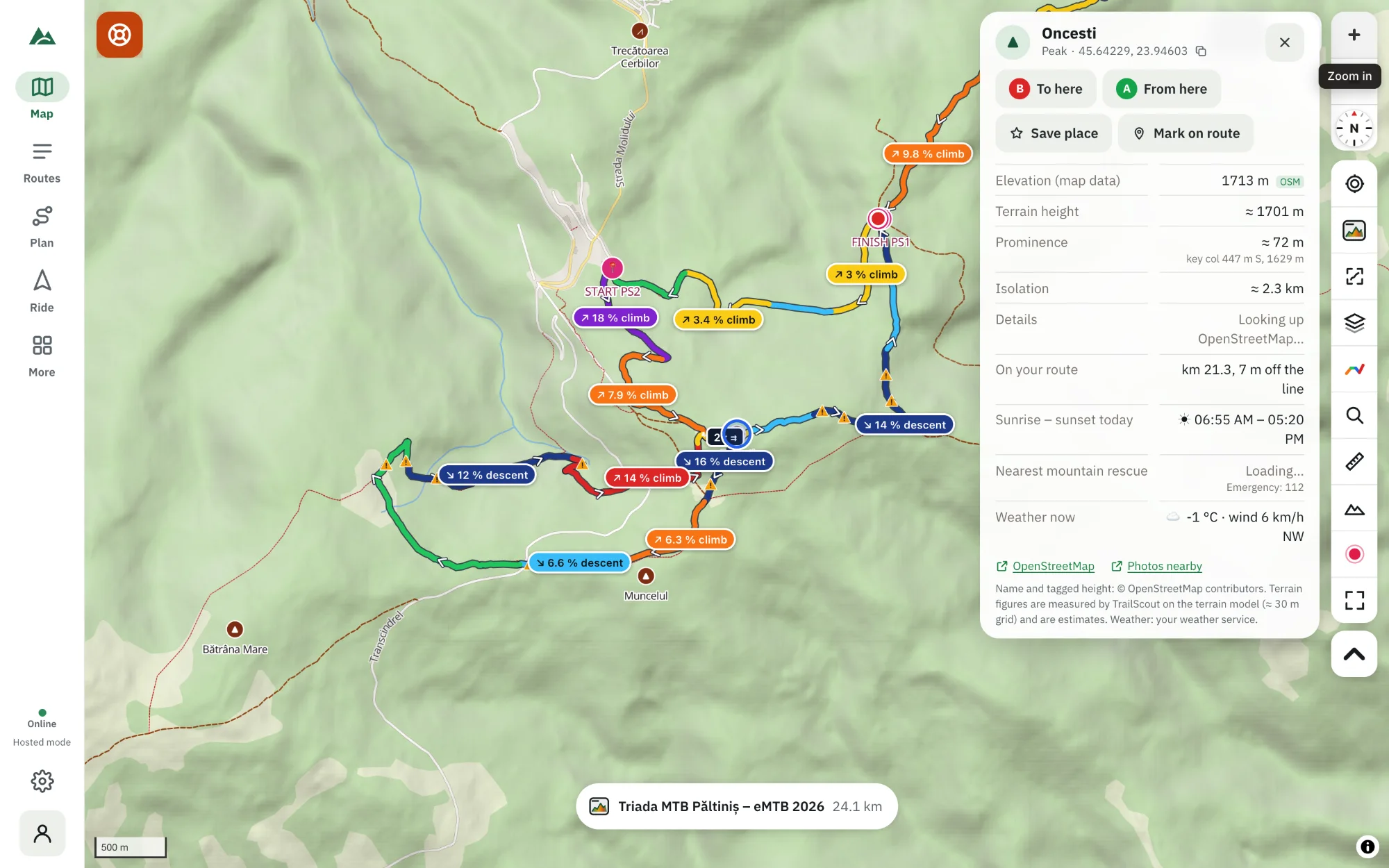
In TrailScout tap a peak's label on the map to open its place card — the height from the map data and measured on the terrain, prominence and key col, isolation, the nearest peak, sunrise and sunset on the place's own clock, the weather now, the nearest mountain rescue, photos taken nearby and its encyclopedia article. Tap a viewpoint and its card adds the view: a panorama computed on the terrain model up to 30 km, how many peaks you can see, the farthest one and the evening golden hour.
Key takeaways
- Prominence = how high a peak rises above the lowest col to higher ground; isolation = how far the nearest higher ground is.
- A viewpoint's panorama is computed from the terrain model, up to 30 km away.
- Times are on the place's clock, even when you plan from another time zone.
- Route to or from a peak, save it, or mark it on your route from the card.
“Which peak is that?” is the oldest question on any summit. TrailScout's place cards answer it — and a lot more — for every peak and viewpoint on the map, before you climb it.
How to open a peak's card
- Open the map in TrailScout and zoom in to the mountains — peaks show a ▲ with their name and height.
- Tap the peak's label to open its place card.
- Or right-click / long-press anywhere and choose What is here for any point on the map.
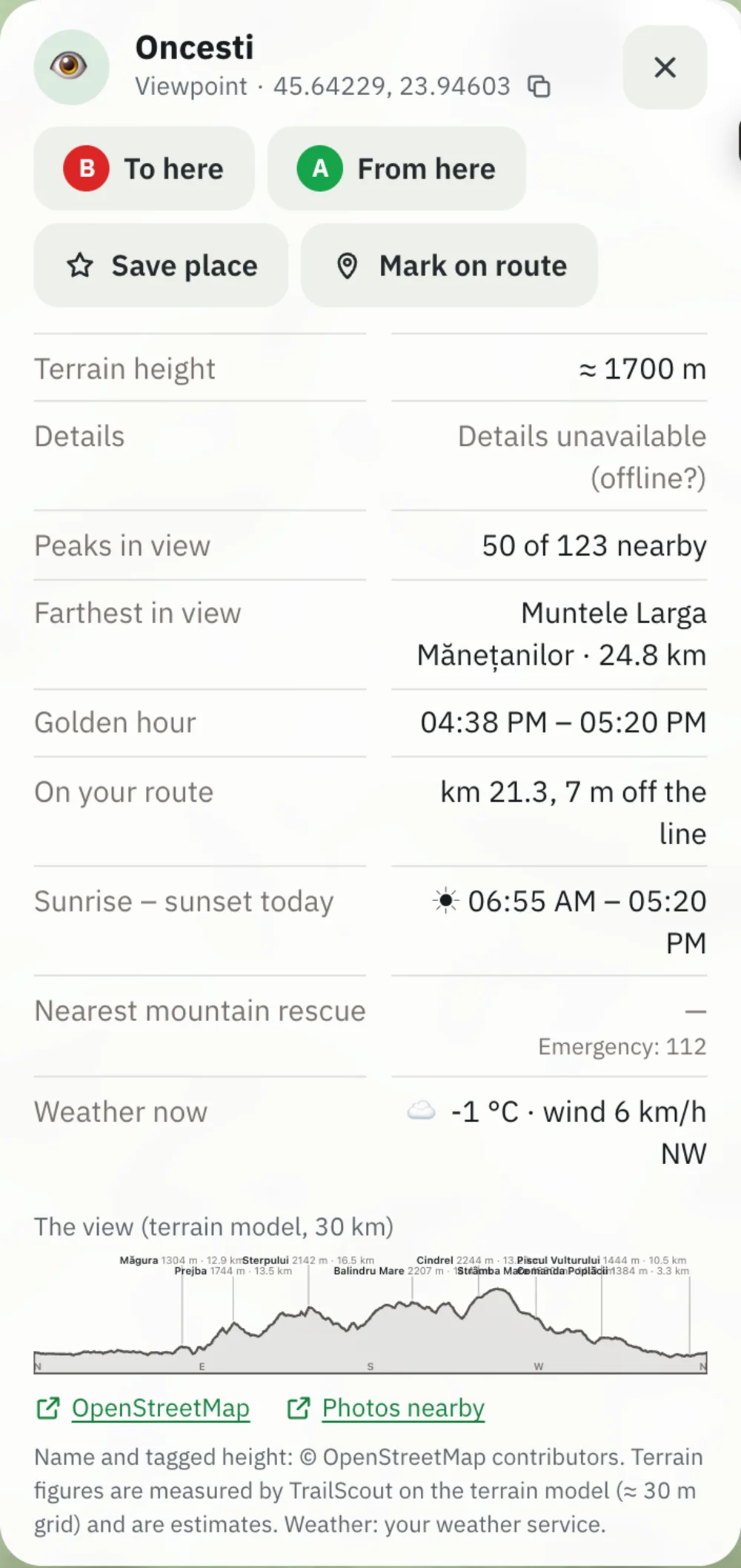
What the card shows
| Section | What it tells you |
|---|---|
| Elevation | the height from the map data and the terrain height measured on the terrain model |
| Prominence | how high it rises above the lowest point (key col) you must go down to before reaching higher ground |
| Isolation | how far the nearest higher ground is |
| Nearest peak | the nearest summit around it — tap to open it |
| Sunrise – sunset | today, on the place's own clock |
| Weather now | temperature and wind on the summit |
| Nearest mountain rescue | within 40 km, with its phone number when mapped |
| From you / on your route | distance from your position, or the km on your route |
| Photos nearby, encyclopedia | photos taken near the place and its article, when there is one |
Prominence and isolation are measured by TrailScout on a terrain model with a grid of about 30 m, so they are good estimates rather than survey figures.
Viewpoints: the panorama
Tap a viewpoint and its card shows the view: a panorama of the horizon computed on the terrain model up to 30 km, with the peaks drawn where they stand. Above it, Peaks in view says how many nearby peaks you can see (and how many are hidden behind ridges), Farthest in view names the most distant one, and the golden hour gives the evening light window.
Other places
Other places get the facts that matter for them — huts (beds, food, water), springs (drinking water, seasonal), waterfalls (drop), caves, heritage sites, bike shops (opening hours). See find water, shelters and bike shops.
Do something with it
- To here / From here — open the A → B planner with the peak filled in.
- Mark on route — add the summit as a waypoint of your route.
- Save place — keep it in one of your lists. See saved places and lists.
- While drawing a route, tapping a peak snaps the point to the summit.
Plan the light
The sunrise and sunset times (and a viewpoint's golden hour) are what you need to plan a summit at dawn or a sunset ride. Combine them with the 3D view's real sun position. See sunrise and sunset at the summit.
Frequently asked questions
What is peak prominence?
The height a summit rises above the lowest col (saddle) you have to descend to before you can climb to higher ground. A big prominence means a “real” mountain, not a bump on a ridge.
What is peak isolation?
The distance to the nearest point of higher ground. A highly isolated peak dominates its surroundings.
How is the panorama made?
From the terrain model: TrailScout works out the horizon in every direction up to 30 km and the peaks that rise above it.
Does the place card work offline?
The terrain figures work wherever the terrain tiles are on your device. Weather, photos and articles need a connection.
Try it on your next ride
TrailScout is free, needs no account and keeps your routes on your device. It runs in the browser on phones, tablets and computers — and works offline.
Open TrailScout →